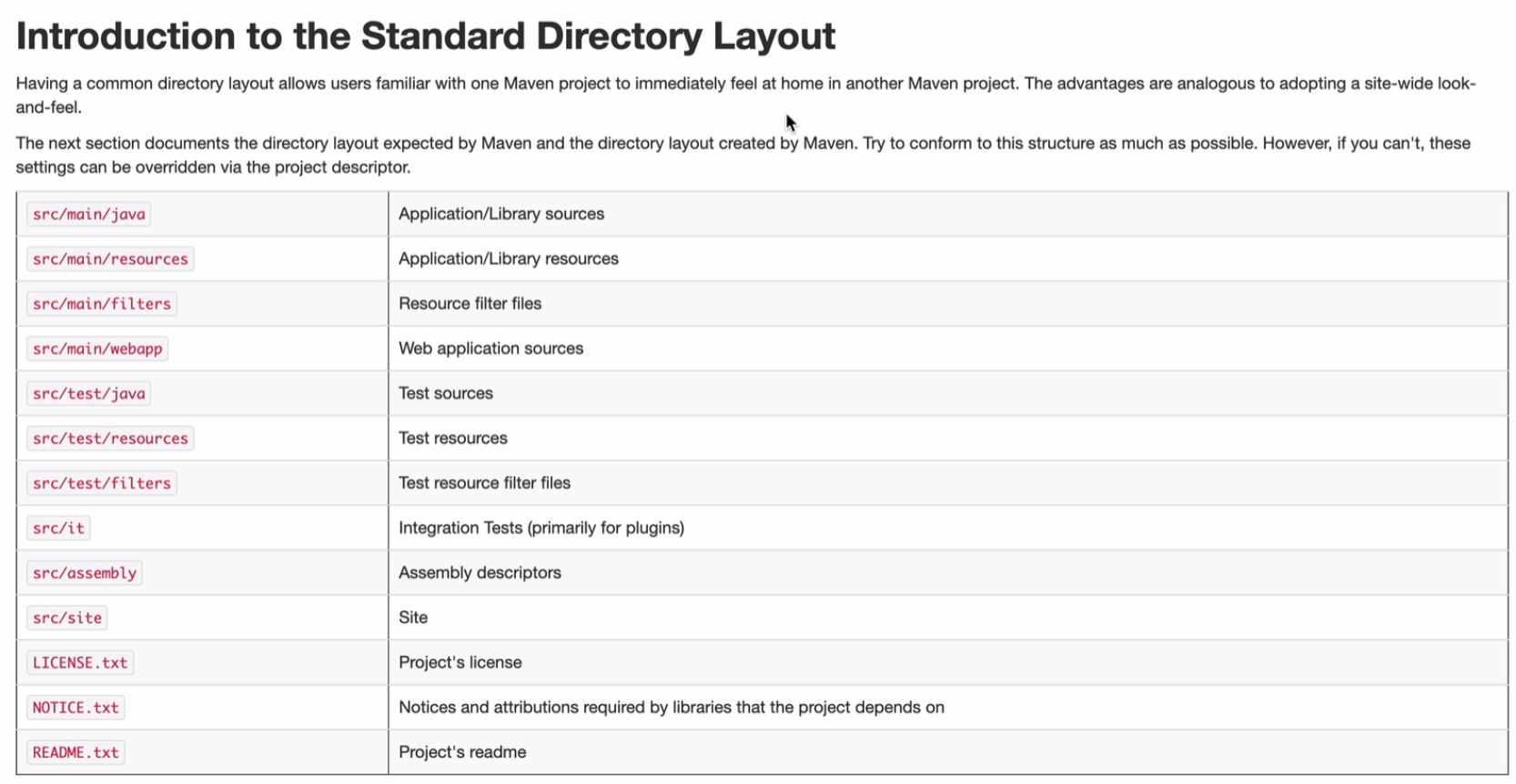
Standard directory layout
Scopes
Maven dependency scopes define the visibility and availability of a dependency in different stages of the project lifecycle. Choosing the correct scope ensures efficient builds, minimal dependency bloat, and optimal resource usage.
1. Compile Scope
-
Description: The default scope for dependencies.
- Dependencies with this scope are required to compile, test, and run the application.
-
Example:
<dependency> <groupId>org.apache.commons</groupId> <artifactId>commons-lang3</artifactId> <version>3.12.0</version> <scope>compile</scope> </dependency> -
Industry Usage:
- Common for core libraries (e.g., utility libraries or frameworks like Spring).
-
When to Use:
- When a dependency is needed across all phases of development, testing, and runtime.
2. Provided Scope
-
Description: Dependencies required at compile time but are provided by the runtime environment.
- Not included in the packaged artifact (e.g., WAR or JAR).
-
Example:
<dependency> <groupId>javax.servlet</groupId> <artifactId>javax.servlet-api</artifactId> <version>4.0.1</version> <scope>provided</scope> </dependency> -
Industry Usage:
- For dependencies provided by application servers (e.g., Tomcat, WebLogic).
- Common in web applications for servlet or JSP APIs.
-
When to Use:
- When running in an environment that supplies the dependency (e.g., container-managed dependencies).
- Avoids duplicating dependencies already available in the runtime.
3. Runtime Scope
-
Description: Dependencies required during runtime but not for compilation.
-
Example:
<dependency> <groupId>mysql</groupId> <artifactId>mysql-connector-java</artifactId> <version>8.0.32</version> <scope>runtime</scope> </dependency> -
Industry Usage:
- Used for JDBC drivers or libraries dynamically linked during runtime.
-
When to Use:
- When the dependency is only necessary during application execution and not during the build process.
4. Test Scope
-
Description: Dependencies required for compiling and running unit tests.
- Not included in the final artifact.
-
Example:
<dependency> <groupId>junit</groupId> <artifactId>junit</artifactId> <version>4.13.2</version> <scope>test</scope> </dependency> -
Industry Usage:
- Testing frameworks like JUnit, TestNG, Mockito, etc.
-
When to Use:
- For test-specific dependencies.
- Ensures test dependencies do not interfere with production builds.
5. System Scope
-
Description: Similar to
provided, but the dependency is explicitly specified with an absolute path.- Not recommended due to its brittle nature.
-
Example:
<dependency> <groupId>example</groupId> <artifactId>custom-library</artifactId> <version>1.0.0</version> <scope>system</scope> <systemPath>${project.basedir}/libs/custom-library.jar</systemPath> </dependency> -
Industry Usage:
- Rarely used due to better alternatives like repositories or artifact hosting.
-
When to Use:
- Only when the dependency cannot be hosted in a repository and must be manually included.
6. Import Scope (Specific to BOM)
-
Description: Used to import dependency management from another POM (Bill of Materials, BOM).
-
Example:
<dependency> <groupId>org.springframework.boot</groupId> <artifactId>spring-boot-dependencies</artifactId> <version>2.7.10</version> <type>pom</type> <scope>import</scope> </dependency> -
Industry Usage:
- For version alignment of dependencies, especially in multi-module projects.
- Popular with frameworks like Spring Boot and Quarkus.
-
When to Use:
- To manage consistent dependency versions across projects.
Quick Summary Table
| Scope | Included in Compilation | Included in Tests | Included in Runtime | Packaged in Artifact | Use Case |
|---|---|---|---|---|---|
| Compile | Yes | Yes | Yes | Yes | Core libraries and frameworks |
| Provided | Yes | Yes | No | No | Server-provided libraries |
| Runtime | No | Yes | Yes | Yes | Runtime-specific dependencies like JDBC |
| Test | No | Yes | No | No | Unit testing dependencies |
| System | Yes | Yes | Yes | Yes | Local, unmanaged dependencies (rarely used) |
| Import | No | No | No | No | Dependency management with BOM |
Best Practices
- Minimize
compilescope:- Use only for essential dependencies to avoid bloating the artifact.
- Prefer
providedfor container-managed environments:- Prevents conflicts with runtime libraries.
- Use
testfor testing frameworks:- Keeps testing dependencies isolated.
- Avoid
systemscope:- Opt for artifact repositories for maintainability.
- Leverage BOMs with
importscope:- Ensures version consistency across projects.
By understanding these scopes and adhering to best practices, developers can maintain efficient, scalable, and conflict-free Maven projects.